
What you’ll learn
You will learn how to translate a merchandising promise into one clear Only Bundles pricing configuration, communicate progress toward it, and verify the result beyond the Admin preview. The editor supports percentage off, fixed amount off, fixed bundle price, and an eligible Buy X Get Y configuration, along with quantity-based options and tiers.
The important decision is not which control looks most powerful. It is which model describes the offer without ambiguity and produces the intended Shopify cart result for every eligible product combination.
Before you begin
Write the offer as a sentence with examples. “Choose any three and save 15%” is a percentage discount. “Save $10 when you choose four” is a fixed amount. “Build the complete set for $60” is a fixed bundle price. If the sentence changes meaning depending on which products are selected, document those examples before configuring the rule.
Collect the lowest and highest eligible product prices and any compare-at pricing that customers may see. Decide whether quantities of the same variant count toward a tier. Make sure the advertised discount is permitted in every market where the bundle will be available.
1. Open Discount & Pricing
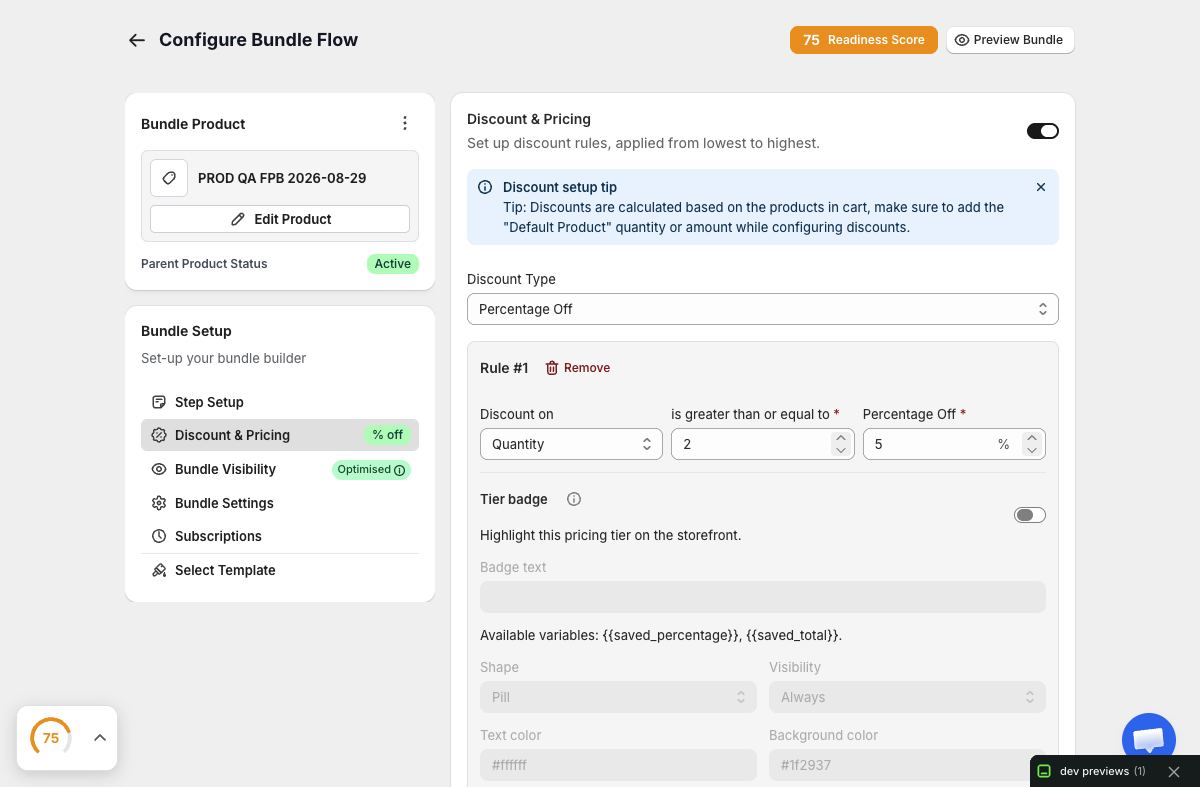
In the bundle editor, open Discount & Pricing and enable the discount only when the bundle needs one. Keeping the switch off is a valid choice: curation, convenience, or a complete routine can be the bundle value.
Select a single primary discount model. Stacking several descriptions of value can confuse customers even when the arithmetic is technically valid. The builder’s preview should mirror the promise the customer read before selecting products.
2. Choose the appropriate model
Percentage Off
Use percentage off when savings should scale with the selected merchandise value. Test both inexpensive and expensive combinations. A percentage is easy to explain, but the absolute saving will vary.
Fixed Amount Off
Use a fixed amount when the same monetary saving applies once the requirement is met. Check that the discount never exceeds the eligible merchandise total and that currency presentation is appropriate for the storefront context.
Fixed Bundle Price
Use a fixed bundle price when the customer is promised one total for the qualifying bundle. Test combinations whose undiscounted totals differ. Define what happens when customers can select beyond the required quantity; otherwise a fixed price can become unclear.
Buy X Get Y
Use Buy X Get Y only when the eligible “buy” and “get” behavior matches the offer you intend. Test which item receives the benefit and how quantity changes affect eligibility. Do not describe it as a general bundle percentage if the rule actually rewards a specific item.
3. Configure tiers deliberately
Tiers can encourage larger bundles, but each threshold must be distinct and achievable. A simple structure might reward three items, then five items. Confirm that the higher tier replaces or advances the lower result as intended rather than producing an unexplained stack.
For each tier, test one item below the threshold, exactly at the threshold, and one item above. Use varied product prices. If customers can add multiples, repeat the test with repeated quantities because the count may be reached differently.
Avoid too many close thresholds. When every click changes the promotion, customers spend more effort reading the rules than choosing products.
4. Align quantity options with pricing
The editor’s bundle quantity options and selection rules should agree with the discount. If a tier begins at five items but the relevant category permits only four, the offer is impossible. If the required bundle ends at three but the best tier begins at six, customers need a clear, valid way to continue selecting.
Review every step or category after changing a pricing threshold. Pricing and selection are configured in different areas, but customers experience them as one contract.
5. Write truthful progress and discount messages
Use Discount Messaging and progress settings to explain three states:
- What the customer can earn before selecting.
- What remains before the next threshold.
- What saving is active after qualification.
Use exact language such as “Add 1 more item to unlock 15% off.” Avoid generic celebration that does not identify the achieved benefit. The message must update when a customer removes an item or moves back below a tier.
If the offer has no discount, do not imply one with phrases like “special price” unless the displayed total truly differs from the component total.
6. Preview diverse combinations
In the bundle preview, test the cheapest qualifying combination, the most expensive qualifying combination, mixed quantities, variant changes, and every tier boundary. Record the component subtotal, expected saving, and expected final total before comparing the UI.
Also test a return to the incomplete state. Remove a product after qualifying and confirm that the active tier, message, displayed saving, and total all revert consistently.
7. Verify Shopify cart and checkout handoff
Publish only to the visibility needed for testing, open a cache-bypassed storefront, and add each representative combination to Shopify cart. Confirm the actual component variants and quantities before evaluating the discount. Then compare the undiscounted component total, discount allocation, and final cart total with your expected examples.
Shopify owns the cart and checkout outcome. Only Bundles should communicate and submit the intended configuration, but a preview alone cannot prove the final commerce result. If your authorized test process includes checkout, stop before creating a real order unless the order is explicitly approved.
Troubleshooting
A tier never unlocks. Compare its threshold with every step/category maximum and with whether repeated quantities count. Confirm the bundle is using the saved configuration you just tested.
The fixed price feels inconsistent. Inspect combinations with very different component totals and any quantity above the minimum. A fixed total may be the wrong model if the assortment permits too much price variation.
The message and total disagree. Treat the calculated Shopify result as decisive. Recheck the selected discount type and thresholds, then remove stale or contradictory customer copy.
Savings disappear after a variant change. Confirm the new variant remains eligible and that its quantity, selling plan, and other conditions still satisfy the rule.
Two promotions produce an unexpected result. Isolate the bundle discount from other store discounts and automatic promotions. Document the intended combination behavior before advertising stacked savings.
Pricing review checklist
- The discount type matches the offer sentence.
- Every threshold is reachable under the bundle’s selection rules.
- Cheapest, highest-priced, and mixed combinations calculate correctly.
- Progress messaging names the remaining action and achieved reward.
- Removing items reverses tier state and totals correctly.
- Shopify cart shows the expected components, allocation, and final total.
Accurate pricing is part of customer trust. Prefer one well-tested rule over a complicated promotion whose edge cases are difficult to explain.